ReelRecs guides
How to review and update your ReelRecs ratings
Open Profile, choose See all for Ranked, and open the movie or show you want to review. Check Your Score and the selected reaction. To change your opinion, choose a different reaction and complete the comparison prompts. Check the resulting Your Score on the title page.
By ReelRecs · Updated October 23, 2026
Find the rating you want to review
Open Profile and find the Ranked section. Choose See all, then open the title. Check its year so you edit the intended movie or show.
On the title page, look for Your Score and the selected reaction: Loved It, It was Okay or Didn’t Like it. These describe your recorded opinion of a title you have rated. Your personal REC SCORE™ is a prediction of fit; it answers a different question. A Friend Score supplies another perspective from followed users’ ratings.
The score guide explains these labels. Before changing anything, identify which score you are looking at.
Change your reaction and answer the comparisons
If your current reaction no longer represents your view, tap the reaction that does. The app can then ask you to compare this title with other titles you have rated.
- Choose your new reaction on the title page.
- For each comparison, select the title you prefer based on your own experience.
- Finish the prompts and inspect the updated Your Score and selected reaction.
Answer the comparisons honestly rather than trying to produce a particular number. The example below shows the resulting score after a reaction change and three comparisons. Your own sequence and result depend on your rating context.
A recorded change from 10 to 6.7
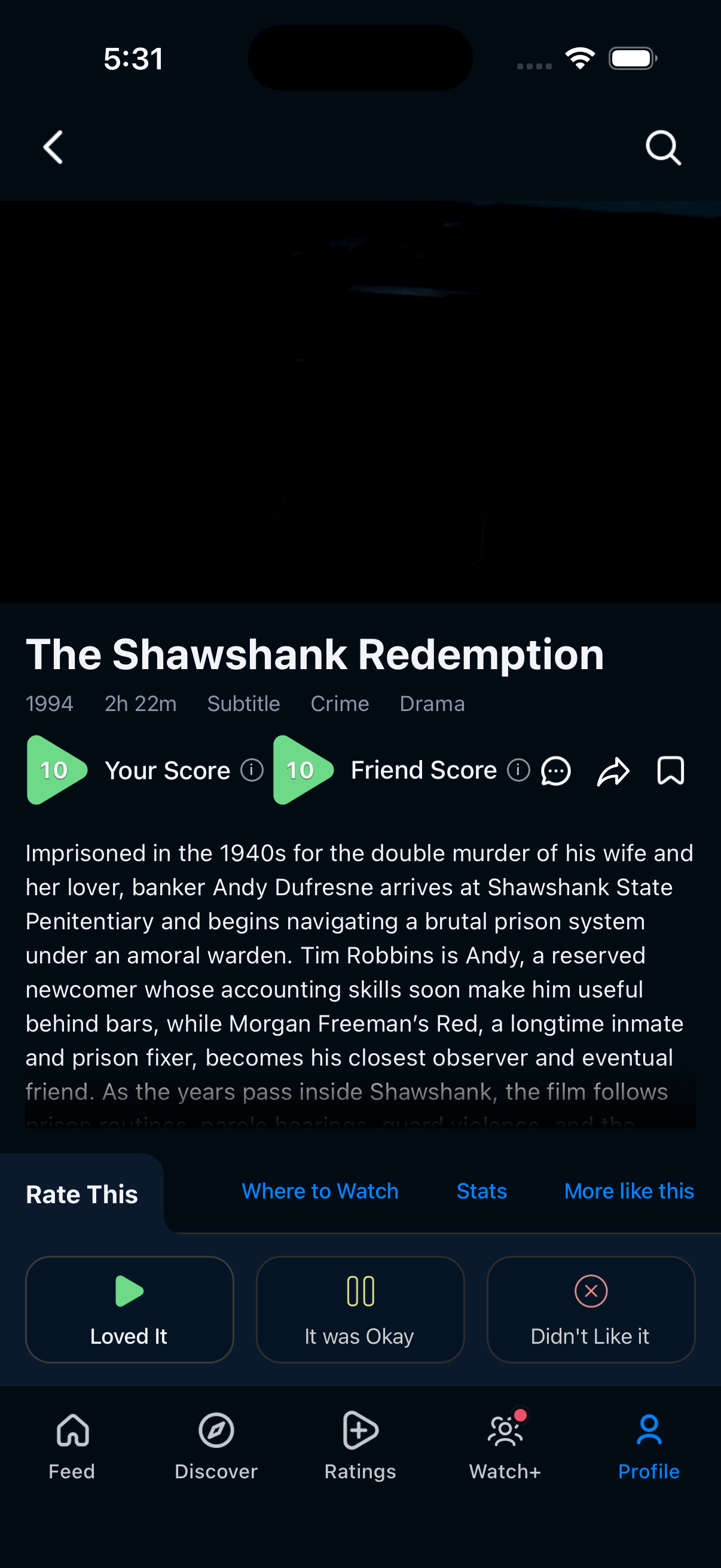
In a recorded walkthrough, the existing Dana Ask demonstration profile opened The Shawshank Redemption (1994) through Profile → See all Ranked. The title initially showed Your Score 10, with Loved It selected.
The operator chose It was Okay. In the following comparisons, they preferred The Shawshank Redemption over The Avengers (2012), The Lion King (1994) and Jurassic Park (1993), in that order. The completed title page showed Your Score 6.7 and It was Okay selected.
| Displayed state | Before | After |
|---|---|---|
| Your Score | 10 | 6.7 |
| Selected reaction | Loved It | It was Okay |
| Friend Score | 10 | 10 |
| Bookmark | Empty | Empty |
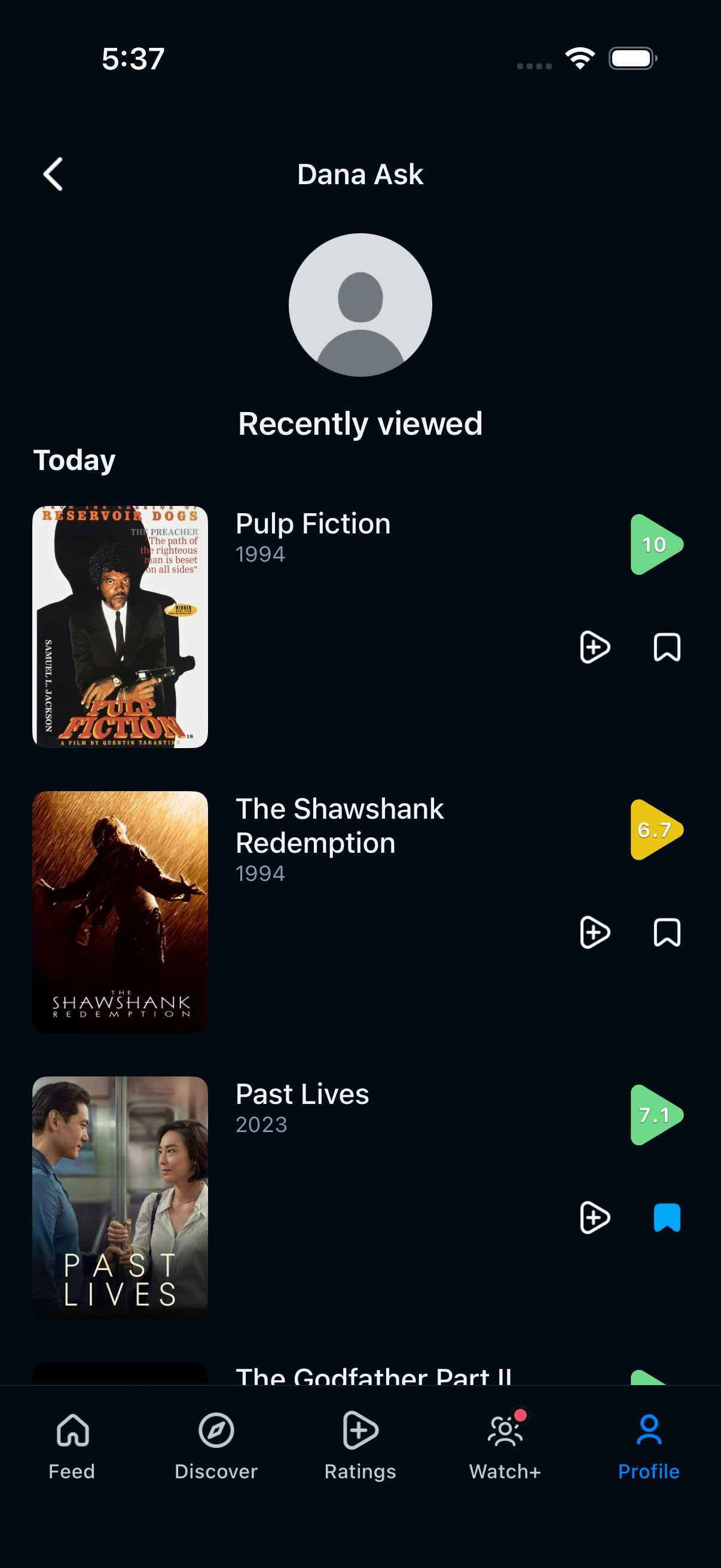
After leaving the title page, the operator opened Profile’s Recently viewed list. The Shawshank Redemption showed 6.7 there as well, as shown in the original list capture. Reopening the title from that list again showed Your Score 6.7, It was Okay, Friend Score 10 and an empty bookmark. The updated rating remained visible across navigation and reopening.
Open the rating options
Tapping the already selected reaction opened a sheet titled Your rating for The Shawshank Redemption. It offered Change rating, Remove rating and Keep. The operator chose Keep in this walkthrough.
These options help you distinguish revising an opinion from leaving it as recorded. The demonstrated edit used a different reaction directly; the recording did not exercise removal. Treat a removal action separately from changing how much you liked a title.
Keep rating and saving separate
Review a rating when you mis-tapped, reconsidered a film or changed your opinion after another watch. Use the bookmark when you want to keep a title available for a future decision. In this example, editing the opinion left the empty bookmark unchanged.
Recorded example: October 23, 2026, ReelRecs 1.0.56 (276), current iOS Release simulator build, existing demonstration profile with 30 ranked titles. The screenshots show the actual values. This walkthrough checks the recorded rating and displayed after-state; it does not measure changes to future recommendations.
Sources and product details
- Personal recommendations: recorded walkthrough
- Save and recover a title: recorded walkthrough
- ReelRecs score definitions
- Official ReelRecs iPhone listing
- Before: Your Score 10 and Loved It selected. Original iOS capture, October 23, 2026.
- After navigation: Recently viewed shows The Shawshank Redemption at 6.7. Original iOS capture, October 23, 2026.


YOUR NEXT WATCH
Find movies and shows that fit your taste.
Rate titles you know. Explore personal recommendations, read why they fit, and save a candidate for later. ReelRecs is free on iPhone and Android; watching takes place through the film or show’s provider.